Windows 2000 pe Ryzen 9, după 20 de ani
May 19, 2020
Windows 2000 on Ryzen 9 after 20 years
I get in touch Windows 2000 in 1999. Using an AMD K6-2/350 and 96MB of RAM, I was well within the minimum specs that indicated a Pentium 133Mhz and 64MB of RAM as a starting point. At the same time, Windows 98 required a minimum of a 486 DX2/66 processor and 16MB of RAM.
Even if you had the necessary hardware, you knew you weren’t making a very wise choice by replacing Windows 98SE with a system based on the NT architecture. First of all, Windows 2000 was a product for the business environment. So it required more resources, wasn’t optimized for gaming, and you generally didn’t get much benefit from using it at home. However, the temptation was irresistible. Windows 2000 was based on the advanced Windows NT architecture, used the NTFS file system while also being FAT16/32 compatible, which allowed an installation of Windows 9X/2000 on the same partition. On the other hand, Windows 2000, due to the NT architecture, was not natively compatible with DOS. You could run DOS programs, but in emulated mode, so with reduced performance, and other DOS programs simply wouldn’t run at all.

Can we install it now, after 20 years, on a Ryzen 9?

Yes, it can be installed, but it takes a bit more effort than Windows 98.


How do we start the installation?
Windows 2000 installation can be started from DOS or as an upgrade from another version of Windows. From DOS, we need to run the winnt.exe file from the i386 folder .

How was the install on an X470GATA board, Ryzen 3900X, 32GB DDR4 and a VooDoo 3?
1. Right from the start… we are greeted with a blue screen of death (BSOD) 0x0000002 BAD_POOL_CALLER . Although it seems that our adventure has already ended, this error is caused by a misunderstanding of the power management interface – ACPI . Windows 2000 gives no further indication of this error, but Windows XP is more nuanced and suggests that the problem seems to be with ACPI, and we can continue the installation without ACPI support by pressing F7 on the next reboot. The method also works 100% in Windows 2000. So when we are called to press F6 to enter the additional drivers we also press F7 to continue the installation, as if nothing had happened.

2. After passing the first obstacle, we will be greeted by a second blue screen: STOP: 0x0000007B . If we have installed Windows XP before, we already know what it is about and how to solve it: we have to change in the BIOS so that our SATA drive (SSD/HDD) uses the IDE standard and not AHCI. If we want AHCI, we have to provide the drivers for the SATA controller on the disk or integrate them into the installation kit with a program like nLite.

Well, newer motherboards may no longer offer this option (IDE/AHCI) – which was the case with the AMD X470 chipset board. So the solution was to look for AHCI drivers for XP and hopefully it will work in 2000, or use the SATA VIA 6421 controller I already had installed in the PCI slot which has drivers for Windows 98 too, let alone 2000.
3. Said and done! VIA’s SATA drivers for the 6421 controller are updated to 2014, and even come with a small utility that prepares the diskette. If I still have an external USB floppy drive from IBM, I say make the floppy, to follow the traditional recipe exactly.

The floppy is made, I restart the installation, when it asks me to press F6 to provide additional drivers, I first press F7 and then immediately F6.

The drivers load successfully, finally the installation gets to the point where we can access the hard drive! But surprise, I can’t press “Enter – to continue”. It seems that the installation crashed just when the hard disk was being accessed, which may have some logic – bad drivers, can’t access the SSD, etc. But the problem is different: the USB keyboard no longer works. Why? Initially – while the DOS part of the installation lasts – the keyboard works through the BIOS which emulates it as PS/2 or AT. Since Windows 2000 tries to bypass the BIOS and access the keyboard and mouse directly, it doesn’t understand the USB drivers and access to them is lost. The solution? A PS/2 keyboard or start the installation with a USB chipset that can be recognized by Windows 2000.
From this moment, there are no more surprises and the installation goes like clockwork, even with the first version of Windows 2000, which has files dated 1999. On top of this you can install Service Pack 4 (120MB), a collection of official updates , and at the end we add: “Update Rollup 1 for Windows 2000 SP4” – another official collection of patches. (32MB)
12 CPUs in Windows 2000?
Yes of course. The system was designed as a multiprocessor and the 12 cores in a Ryzen 3900X are detected as such.

 Categorie: Hardware & Software, Nostalgia
Comentarii
Nelamuriri? Intrebari?
Intreaba sau cauta raspunsul la sectiunea de intrebari si raspunsuri.
What's new...?
- Windows vechi, SSD nou? Cum mutăm instalarea? Clonăm sau copiem? (…că merge și așa)
- Să instalăm o placă 3dfx Voodoo2 pe un sistem AM5 și Windows 11? Nimic mai complicat…
- Un SSD M.2 NVMe pe un Pentium II?
- Windows 11 pe o placă de bază Intel i865 cu DDR1 si AGP 8X?
- Ce se întâmplă dacă montăm o placă GTX/RTX într-un slot PCI din anii ’90?
- Windows Longhorn build 4074 și Vista pe hardware modern?
- Windows NT 4.0 primește suport NVMe în 2025
- Driver NVMe pentru Windows 98?
- Cum să rulezi Windows 98 de pe un USB 4 ultra-rapid
- Cum ar fi să instalăm o placă grafică PCI veche într-un computer de ultimă generație?
- Windows 98 la maxim: cum să instalăm cele mai performante plăci video PCI-Express compatibile – NVIDIA seria 7000
- Half-Life 2 pe Windows 98: Încă merge, dar cum?
- Cum să bootăm de pe un Voodoo 3 PCI pe un PC modern în Windows 9x (în timp ce avem o placă PCI-E in slotul 16X)
- Cum facem să avem USB funcțional în Windows 98, 2000, XP pe plăci de bază moderne?
- Acum se poate! Windows 98 / ME pe ultima generație de procesoare Intel și AMD!
- DOOM for Windows – un software pe 32bit compatibil cu Windows 3.11 dar și Windows 11! *fara niciun fel de modificări
- My computer in octombrie 2000
- Windows 3.11 pe Ryzen 3900X [youtube video]
- DiskWrite
- Windows NT 3.1, primul sistem de operare pe 32bit, ruleaza si pe hardware nou
- Windows Vista pe hardware modern? Desigur!
- Oh la la! Windows NT 3.51 pe hardware nou! Nu credeam ca se poate.
- Cum instalam Windows 98SE pe un PC modern
- 2020 – Hardware compatibil cu Windows 9x care poate fi cumpărat de nou
- Valorant – sau ce se întâmplă dacă mixăm League of Legends, Counter-Strike și Fortnite
 Da, Windows 98 se poate instala si pe PC-urile de ultima generatie, direct pe un SSD ultra rapid. Nu conteaza ca avem multe core-uri, DDR4, PCI-Express s.a.m.d. Daca avem și placa video compatibila (ceva mai veche, fireste) avem parte si de rezolutie full hd. Cum facem? Gasiti aici documentatia completa, grupata pe episoade. Citeste »
Software:
Da, Windows 98 se poate instala si pe PC-urile de ultima generatie, direct pe un SSD ultra rapid. Nu conteaza ca avem multe core-uri, DDR4, PCI-Express s.a.m.d. Daca avem și placa video compatibila (ceva mai veche, fireste) avem parte si de rezolutie full hd. Cum facem? Gasiti aici documentatia completa, grupata pe episoade. Citeste »
Software:
- Windows 98 – episodul partiția și formatarea
- Windows 98 – episodul cu instalarea
- Windows 98 – episodul cu prea multa memorie RAM
- Benchmark i7-3770 3.4Ghz vs Pentium II
- Windows 98 – episodul cu UEFI și CSM-ul
- Windows 98 – episodul cu SSD-ul
- Windows 98 – episodul cu placa video.
- Windows 98 în Full HD – episodul cu monitorul
- Windows 98 – episodul cu mouse-ul
- Windows 98 – episodul cu USB-urile
- Windows 98 – episodul cu procesorul și memoria de ultimă generație
- Windows 98 – episodul cu placa de sunet
- Windows 98 – episodul cu placa de rețea și Internetul
 Magic Lantern: superputeri pentru DSLR-urile CANON
Magic Lantern este un program compatibil cu anumite DSLR-uri CANON (decât!), se instaleaza pe cardul de memorie si ofera functii avansate, precum posibilitatea de a filma RAW, la fel ca si camerele profesionale. Un aspect important (si incurajator) este ca acest soft nu modifica nici un bit din firmware-ul camerei. Daca scoatem sau formatam cardul de memorie, e ca si cum Magic Lantern n-a interactionat niciodata cu camera. Desi producatorii o tin sus si tare ca nu ofera nici cea mai... [Citeste] »
 Quake II RTX
Quake II (de la iD software) lansat in 1997 este un FPS de referință in istoria gamingului. Pe lângă numeroasele premii si fan club-uri active si in prezent, cea mai buna dovada este că jocul a fost re-engineered dupa 22 de ani și acum beneficiază de suport RTX. Pe moment, nu stiu niciun un alt joc care sa fi primit aceasta șansă, dar este posibil sa vedem pe viitor si alte remake-uri. Un Half-Life RTX ar fi ceva extraordinar. Engineul din Quake II (extra modificat) a stat la baza Half-Life.... [Citeste] »
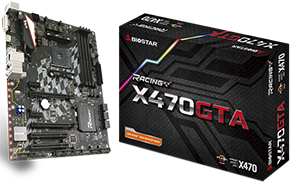 Biostar X470GTA placa de baza AM4 cu sloturi PCI clasice
« 1 2 | Vezi toate paginile» An AM4 high end motherboard with 2 classic PCI slots? Yes, it is possible, and it is codenamed: Biostar X470GTA. Biostar brand is more associated with low end boards, generally very cheap ones. If in the past you bought a computer from a retailer like Altex, you may have come across a Biostar board. Otherwise, Biostar is a company with a tradition – founded in 1986 – and when it comes to motherboards, they also have advanced models at good prices.... [Citeste] »
 Placa video de 1MB?
Back in 1996 – sau ce se mai poate face cu o placa video de 1MB? Avem un sistem nou motorizat de un procesor Intel Dual Core @3Ghz, o placa de bază cu chipset Intel P35, 2GB RAM DDR2 ce rulează la 1000Mhz, dar nu avem placă video… Soluţia de moment e să apelăm la placa video de la calculator mai vechi pe care nu ne-am indurat să-l aruncăm la gunoi. Ei, şi ce găsim? ... [Citeste] »