

Cum instalam Windows 1.0 pe un PC ultimul răcnet
May 14, 2020
How to install Windows 1.0 on a last-generation PC
May 14, 2020
Windows 1.0 was released in the fall of 1985. Due to the backward compatibility of the x86 architecture it can also be installed on a last generation system. The newest configuration I’ve run Windows 1.0 on in real mode is a Ryzen 3900x , on an X470 chipset motherboard, 32GB DDR4 RAM @ 3200 and an RTX 2070 Super video card.
-

According to Microsoft, Windows 1.0 requires a minimum of 256 KB of RAM, two floppy disk drives, and a video card. For running multiple programs, hard disk installation and 512 KB RAM are recommended. Requires DOS 3.0 or higher.
Back in the mid-80s, Windows 1.0 made a decent impression and that’s about it, it wasn’t taken very seriously, as evidenced by the fact that there aren’t many programs and games developed for Windows 1.x and 2.x. The main advantage of Windows 1, namely the possibility of using a mouse, came at a time when ordinary PCs were generally not equipped with a mouse. Windows 3.x is on a whole other level and it really is a system you can do interesting things with, especially since you have Office, Photoshop, Premiere and hundreds of other titles available. With Windows 3.11 you can connect to the Internet using TCP/IP. No wonder, with all its limitations, Microsoft effectively pulled Windows 3.11 from the market in 2008 .
To be or not to be… operating system
Because Windows 1.0 appears to be more of a graphical interface for MS-DOS, it has been questioned whether it is really an operating system. We have to keep in mind that Windows 1.0 works with its own hardware drivers which is way above the level of a simple GUI.


Stranger Things
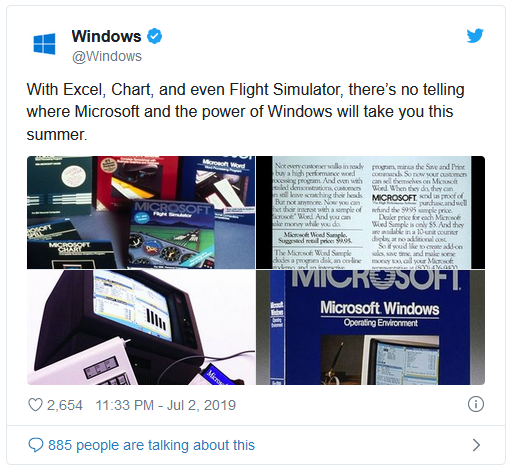
Due to the mega-popularity of Stranger Things , which pays homage to the 80s, and which in its last season reached the age of Windows 1.0, Microsoft did a little advertising for it last year. Season 4 which takes place in 1986 when the Chernobyl event also takes place and which integrates perfectly into the Stranger Things story.
Where do we get Windows 1.0?
Obviously not from Microsoft. For retro operating systems there is only one reference site, and it is called winworldpc.com . In case winworld fails, I will put the download kit at the end of the article.

Once we get to the download page, we also download Windows 2.0 because we need the mouse driver, the mouse.drv file. Windows 1.0 will not work with our mouse on PS/2. (in 1985 the standard was not even invented).
I no longer have a floppy drive, what do I do?
No problem, no one has anymore. After we download the installer – which is a 528KB .7z archive – we’ll use 7zip to extract the installer.
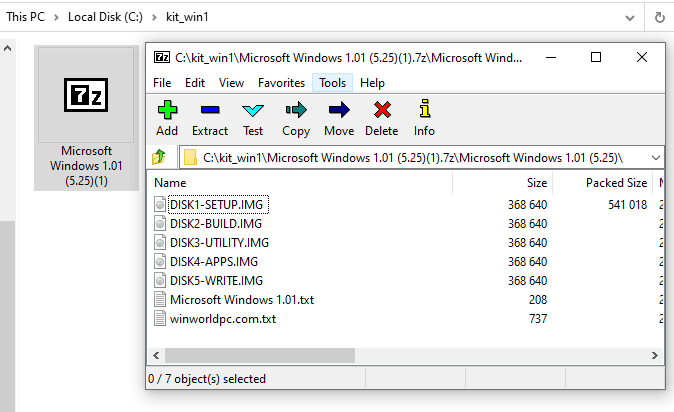
Archive in Archive: Our files are contained in 5 diskette images. To make things extremely simple, 7zip lets us extract from disk images all the files in one place using the Extract Here command.

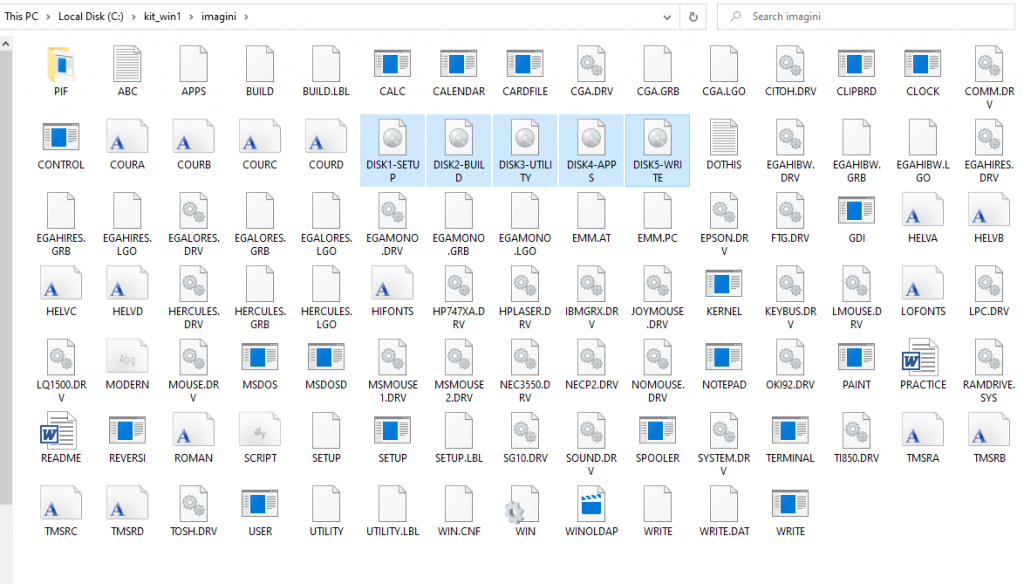
Back to DOS
Because Windows 1.0 is more of an extension to DOS and less of an operating system per se , since we have the files below on a bootable DOS partition, we can start the installation. Windows 1.0. it uses a text interface for installation and we have to express our options using numbers or letters: C to C continue, Q to Q uit, Y for Y es and N for N o, etc.


Order subst
To get to the lovely screens above, we can’t run setup.exe if it’s in a C: folder (at least, not on the first try). Let’s not forget: it’s 1985, and the folks at Microsoft are obligingly expecting us – just like any sane human being – to boot from the floppy drive, which is A:
So we’re at a bit of an impasse, because a FAT 16 DOS partition will get the letter C: when we boot from it. Fortunately, since DOS 5, there is the external command subst (external: that is, it requires the file subst.exe) by which we can assign a drive letter to a folder, including the letter A. The syntax is as follows:
subst [<Drive1>: [<Drive2>:]<Path>] subst A: C:\kit

For this command to work, it is enough to copy the file subst.exe to C:\ if we do not have a full DOS installation, which includes all utilities.)
Let’s also set the DOS version with setver
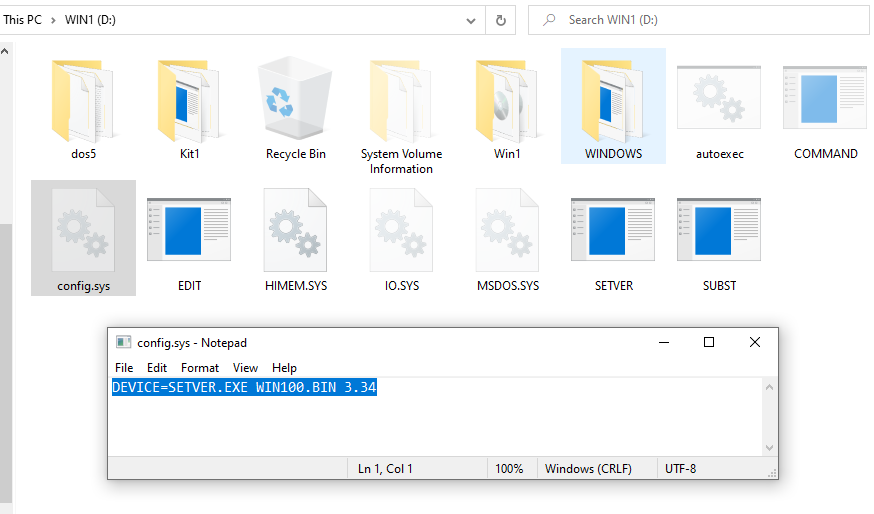
Setver.exe, like subst.exe, is also part of the DOS 5 (and following) special team set to “spoof”. Setver will make a program – which needs a specific version of DOS – think that the current version of DOS is the one it needs. To get this trick, copy setver.exe to C: and add the following line to config.sys:
DEVICE=SETVER.EXE WIN100.BIN 3.34
Windows 1.0 will think it’s using DOS 3.34 and finally boot.
It installed for me but did not start. Time for VGASETUP.EXE!
You see, I suffered the same. In my case, the problem was from the RTX 2070 Super video card that did not want to start in EGA mode which is implemented in the EGAHIRES.DRV driver , i.e. the best display mode since 1985. Although the RTX is compatible with the VGA standard ( introduced in 1987) and by default also with the previous EGA standard – simply the system that blocks when entering Windows. The solution comes with installing a 640×480 VGA driver and running VGASETUP.EXE – the file this utility creates.

To use this driver we need to restart the installation process and copy WIN1VGA.EXE to the installation folder, it will patch some files and create a VGASETUP. EXE from which we will start the installation and we will be able to select as VGA video mode. Here are its own installation instructions:
Instrucțiuni ~~~~~~~~~~~~
 1. Extrageți toate fișierele de instalare Windows 1.0 într-un director pe hard disk. [ceea ce noi am făcut deja]    (de exemplu, C: \ WINSETUP).
2. Copiați WIN1VGA.EXE în acel director și rulați-l. Un nou driver și un nou program setup va fi creat.
Victory! We have Windows 1.0 working perfectly!


The installation kit
How about having all Windows 1.0 installation files already unzipped in one folder including mouse driver + VGA driver already installed (we start installation from vgasetup.exe) + subst.exe and setver.exe in one 554 KB archive?
https://www.pinzaru.ro/kit_windows_1.0.7z
 Categorie: DOS, Hardware & Software, Nostalgia
Comentarii
Un comentariu la articolul “Cum instalam Windows 1.0 pe un PC ultimul răcnet”
Nelamuriri? Intrebari?
Intreaba sau cauta raspunsul la sectiunea de intrebari si raspunsuri.
What's new...?
- Windows vechi, SSD nou? Cum mutăm instalarea? Clonăm sau copiem? (…că merge și așa)
- Să instalăm o placă 3dfx Voodoo2 pe un sistem AM5 și Windows 11? Nimic mai complicat…
- Un SSD M.2 NVMe pe un Pentium II?
- Windows 11 pe o placă de bază Intel i865 cu DDR1 si AGP 8X?
- Ce se întâmplă dacă montăm o placă GTX/RTX într-un slot PCI din anii ’90?
- Windows Longhorn build 4074 și Vista pe hardware modern?
- Windows NT 4.0 primește suport NVMe în 2025
- Driver NVMe pentru Windows 98?
- Cum să rulezi Windows 98 de pe un USB 4 ultra-rapid
- Cum ar fi să instalăm o placă grafică PCI veche într-un computer de ultimă generație?
- Windows 98 la maxim: cum să instalăm cele mai performante plăci video PCI-Express compatibile – NVIDIA seria 7000
- Half-Life 2 pe Windows 98: Încă merge, dar cum?
- Cum să bootăm de pe un Voodoo 3 PCI pe un PC modern în Windows 9x (în timp ce avem o placă PCI-E in slotul 16X)
- Cum facem să avem USB funcțional în Windows 98, 2000, XP pe plăci de bază moderne?
- Acum se poate! Windows 98 / ME pe ultima generație de procesoare Intel și AMD!
- DOOM for Windows – un software pe 32bit compatibil cu Windows 3.11 dar și Windows 11! *fara niciun fel de modificări
- My computer in octombrie 2000
- Windows 3.11 pe Ryzen 3900X [youtube video]
- DiskWrite
- Windows NT 3.1, primul sistem de operare pe 32bit, ruleaza si pe hardware nou
- Windows Vista pe hardware modern? Desigur!
- Oh la la! Windows NT 3.51 pe hardware nou! Nu credeam ca se poate.
- Cum instalam Windows 98SE pe un PC modern
- 2020 – Hardware compatibil cu Windows 9x care poate fi cumpărat de nou
- Valorant – sau ce se întâmplă dacă mixăm League of Legends, Counter-Strike și Fortnite
 Da, Windows 98 se poate instala si pe PC-urile de ultima generatie, direct pe un SSD ultra rapid. Nu conteaza ca avem multe core-uri, DDR4, PCI-Express s.a.m.d. Daca avem și placa video compatibila (ceva mai veche, fireste) avem parte si de rezolutie full hd. Cum facem? Gasiti aici documentatia completa, grupata pe episoade. Citeste »
Software:
Da, Windows 98 se poate instala si pe PC-urile de ultima generatie, direct pe un SSD ultra rapid. Nu conteaza ca avem multe core-uri, DDR4, PCI-Express s.a.m.d. Daca avem și placa video compatibila (ceva mai veche, fireste) avem parte si de rezolutie full hd. Cum facem? Gasiti aici documentatia completa, grupata pe episoade. Citeste »
Software:
- Windows 98 – episodul partiția și formatarea
- Windows 98 – episodul cu instalarea
- Windows 98 – episodul cu prea multa memorie RAM
- Benchmark i7-3770 3.4Ghz vs Pentium II
- Windows 98 – episodul cu UEFI și CSM-ul
- Windows 98 – episodul cu SSD-ul
- Windows 98 – episodul cu placa video.
- Windows 98 în Full HD – episodul cu monitorul
- Windows 98 – episodul cu mouse-ul
- Windows 98 – episodul cu USB-urile
- Windows 98 – episodul cu procesorul și memoria de ultimă generație
- Windows 98 – episodul cu placa de sunet
- Windows 98 – episodul cu placa de rețea și Internetul
 Magic Lantern: superputeri pentru DSLR-urile CANON
Magic Lantern este un program compatibil cu anumite DSLR-uri CANON (decât!), se instaleaza pe cardul de memorie si ofera functii avansate, precum posibilitatea de a filma RAW, la fel ca si camerele profesionale. Un aspect important (si incurajator) este ca acest soft nu modifica nici un bit din firmware-ul camerei. Daca scoatem sau formatam cardul de memorie, e ca si cum Magic Lantern n-a interactionat niciodata cu camera. Desi producatorii o tin sus si tare ca nu ofera nici cea mai... [Citeste] »
 Quake II RTX
Quake II (de la iD software) lansat in 1997 este un FPS de referință in istoria gamingului. Pe lângă numeroasele premii si fan club-uri active si in prezent, cea mai buna dovada este că jocul a fost re-engineered dupa 22 de ani și acum beneficiază de suport RTX. Pe moment, nu stiu niciun un alt joc care sa fi primit aceasta șansă, dar este posibil sa vedem pe viitor si alte remake-uri. Un Half-Life RTX ar fi ceva extraordinar. Engineul din Quake II (extra modificat) a stat la baza Half-Life.... [Citeste] »
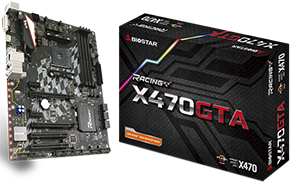 Biostar X470GTA placa de baza AM4 cu sloturi PCI clasice
« 1 2 | Vezi toate paginile» An AM4 high end motherboard with 2 classic PCI slots? Yes, it is possible, and it is codenamed: Biostar X470GTA. Biostar brand is more associated with low end boards, generally very cheap ones. If in the past you bought a computer from a retailer like Altex, you may have come across a Biostar board. Otherwise, Biostar is a company with a tradition – founded in 1986 – and when it comes to motherboards, they also have advanced models at good prices.... [Citeste] »
 Placa video de 1MB?
Back in 1996 – sau ce se mai poate face cu o placa video de 1MB? Avem un sistem nou motorizat de un procesor Intel Dual Core @3Ghz, o placa de bază cu chipset Intel P35, 2GB RAM DDR2 ce rulează la 1000Mhz, dar nu avem placă video… Soluţia de moment e să apelăm la placa video de la calculator mai vechi pe care nu ne-am indurat să-l aruncăm la gunoi. Ei, şi ce găsim? ... [Citeste] »


[…] Da, putem începe lista chiar cu Windows 1.0 din 1985! Windows 1.0 nu este chiar un sistem de operare per se, mai mult o interfață grafica pentru DOS. Așadar, daca putem rula DOS pe un PC avem toate șansele să pornim și Windows 1.0. Și într-adevăr, se poate. Necesită puțina muncă driverul VGA, pentru care avem nevoie de un patch. Și mouse-ul PS2-ul necesită puțina atenție specială, întrucât în 1985 nici nu exista acest standard care a fost lansat de IBM tocmai in 1987. Din fericire, Windows 2.0 din 1987… este pregătit să lucreze cu mouși PS2 așa că vom împrumuta driverul de mouse de acolo. Stai un pic că eu am mouse pe USB? Nicio problemă, BIOS-ul emuleaza mouse-ul USB ca pe unul PS2… așa că va merge în Windows 1.0 și 2.0. Găsiți aici toate detaliile aici. […]